
Anúncios
Learning violin no longer requires a private teacher sitting beside you every single week. The right app can guide your bow hold, pitch, and rhythm from day one. 🎻
Violin has a reputation for being one of the hardest instruments to pick up, and honestly, that reputation isn’t entirely wrong. Intonation, posture, and bow control all demand attention at once.
That’s exactly why a well-designed app for learning violin matters so much. It breaks down these overlapping skills into manageable steps, gives instant feedback, and keeps you motivated through structured practice.
Why Pitch Recognition Technology Changed Everything#
A decade ago, the only way to know if your note was flat or sharp was a teacher’s ear — or a tuner clipped to your scroll. Today, apps use real-time pitch detection through your phone’s microphone.


This means the app listens to every note you play and tells you, within cents of accuracy, whether you’re in tune. For beginners, that immediate correction prevents bad habits from forming in the first place.
- Instant visual feedback: colored indicators show sharp, flat, or in-tune notes
- Rhythm tracking: the app flags timing errors as you play along
- Progress history: you can see accuracy improve week over week
Apps like Trala built their entire teaching method around this kind of listening technology, which is a big reason they’ve become popular among self-taught violinists.
What a Good Violin Learning App Actually Teaches#
It’s easy to assume these apps just offer video tutorials. In practice, the better ones function more like a structured curriculum than a YouTube playlist.
Foundational Technique#
Before touching a single song, solid apps spend real time on bow hold, left-hand position, and posture. Skipping this step is the number one reason self-taught players develop pain or plateau early.
Note Reading and Ear Training#
Some learners want to read sheet music fluently; others prefer playing by ear. A flexible app supports both paths, offering notation-based lessons alongside call-and-response ear exercises.
Repertoire Progression#
Good apps sequence songs by difficulty — starting with open strings and simple folk tunes, then moving toward first-position melodies, and eventually basic classical pieces like Twinkle Twinkle Little Star variations or short Suzuki-method excerpts.
Comparing Features Across Popular Violin Apps#
Not every app covers the same ground. Here’s a practical breakdown of what to expect from the main categories available in app stores today.
| Feature | Beginner-Focused Apps | Tuner-Only Apps | Full Curriculum Apps |
|---|---|---|---|
| Pitch Detection | ✔️ Basic | ✔️ Advanced | ✔️ Advanced |
| Structured Lessons | ✔️ | ❌ | ✔️ |
| Progress Tracking | Limited | ❌ | ✔️ Detailed |
| Song Library | Small | ❌ | Large |
| Price Range | Free–$5/mo | Free | $10–$20/mo |
If your goal is simply tuning your instrument before rehearsal, a tuner-only app does the job. But if you’re building skill from zero, a full curriculum app pays off within the first few weeks.
Setting Up a Realistic Practice Routine#
Downloading an app won’t teach you anything by itself. Consistency is what moves the needle, and most apps are designed around short, daily sessions rather than long weekend marathons.
- 15–20 minutes daily beats one 2-hour session on Sundays
- Warm up with open strings before jumping into new material
- Record yourself weekly to compare against the app’s accuracy scores
- Repeat lessons instead of rushing to the next level
Most apps include streak counters and reminder notifications specifically because habit formation, not raw talent, determines whether someone sticks with violin past month three.
How Trala Structures the Learning Experience#
Trala is one of the apps built specifically around real-time audio feedback. Instead of generic video lessons, it listens through your phone’s microphone and adjusts guidance based on what you actually play.
The app organizes learning into bite-sized modules, each targeting a specific skill — like shifting between strings cleanly or holding a steady tempo. This modular approach keeps sessions from feeling overwhelming.

Violin by Trala â Learn violin
Installs500K+
Size184.6MB
PlatformAndroid/iOS
PriceFree
Information about size, installs, and rating may change as the app is updated in the official stores.
For adult beginners especially, this kind of app removes a huge psychological barrier: the fear of playing wrong notes in front of a teacher. Practicing privately, with honest feedback from software instead of judgment, often accelerates confidence.
Common Mistakes Beginners Make With Learning Apps#
Even with great technology, people sabotage their own progress in predictable ways. Recognizing these patterns early can save months of frustration.
Skipping the Tuning Step#
Playing an out-of-tune violin trains your ear incorrectly from the start. Always tune before every single practice session — most apps include a built-in tuner for exactly this reason.
Ignoring Posture Feedback#
It’s tempting to skip past posture tips to get to “the fun part.” But poor shoulder or wrist position leads to tension injuries that can sideline practice for weeks.
Comparing Progress to Other Users#
Apps often show leaderboards or community scores. These can motivate some players and discourage others. Focus on your own accuracy trend, not someone else’s streak count.
Physical Setup: What the App Can’t Teach You#
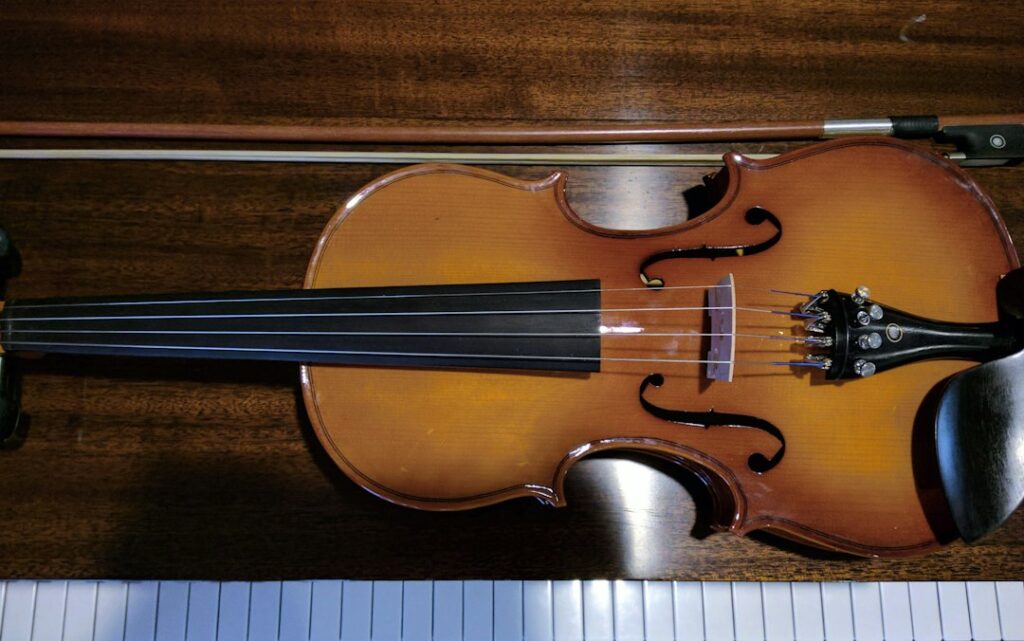
No app can select the right violin size or tell you if your bridge is properly positioned. Before relying heavily on any digital tool, a few physical basics matter:
- Correct violin size: a 4/4 full-size instrument isn’t automatically right for every adult hand
- Fresh strings: old strings go false and throw off pitch detection accuracy
- Properly rosined bow: without rosin, the app may misread your tone as weak or unclear
- A quiet practice space: background noise confuses microphone-based pitch tracking
A quick visit to a local music shop for a setup check, even once a year, complements whatever the app teaches you digitally.
Choosing Between Free and Paid Violin Apps#
Free versions typically unlock the first few lessons, a basic tuner, and limited song choices. That’s enough to test whether you enjoy the format before committing financially.
Paid tiers usually unlock the full song library, detailed progress analytics, and sometimes live feedback sessions with real instructors layered on top of the automated lessons.
A fair test: stick with the free tier for two to three weeks. If you’re practicing consistently and craving more structured content, upgrading tends to be worth it.
Making Violin Practice Stick Long Term#
The novelty of a new app wears off around week four for most people. What keeps players going past that point is seeing measurable improvement — hitting a scale cleanly, nailing a song’s rhythm, finally getting vibrato to sound intentional.
Pairing an app with occasional check-ins from an experienced player, even informally, catches technique issues that software alone might miss. Many learners use apps for daily drilling and save in-person lessons for monthly tune-ups.
Violin rewards patience more than any other instrument. An app won’t shortcut that truth, but it does make the daily grind feel structured, measurable, and honestly, a lot more enjoyable than practicing scales alone in silence.
Keep reading
You might also like
Best Remote Control Apps for Your Devices in 2024
Remote control apps turn your smartphone into a universal clicker for TVs, streaming boxes, air conditioners, and more — no extra hardware…
Best Remote Control App Solutions for Smart Devices
Turning your phone into a universal remote sounds simple, but picking the right **remote control app** can transform how you manage every…