
Anúncios
Turning your smartphone into a precise measuring tool sounds futuristic, but millions already use it daily for quick, reliable results without a physical tape measure.
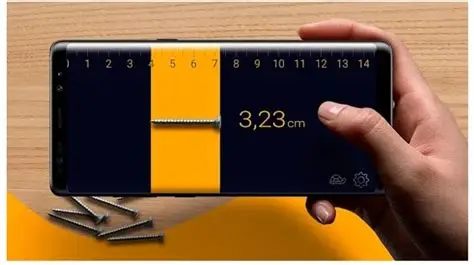
A digital tape measure app uses your phone’s camera, sensors, and augmented reality technology to calculate distances, heights, and areas. No tape, no ladder, no second person holding the other end.
Whether you’re hanging a shelf, buying furniture, or estimating materials for a home project, this kind of tool saves time and reduces guesswork considerably.
How Smartphone Measuring Technology Actually Works#
Most measuring apps rely on ARKit (iOS) or ARCore (Android), frameworks that let your phone understand physical space through the camera lens combined with motion sensors.
The app tracks feature points — corners, edges, textures — in the environment. By comparing how these points shift as you move the phone, it calculates real-world distances with surprising accuracy.


Some apps add LiDAR support on newer iPhones (iPhone 12 Pro and later), which uses light pulses to map depth instantly. This drops the margin of error from a few centimeters down to a few millimeters in ideal conditions.
- Camera-based AR: Works on most smartphones from 2018 onward
- LiDAR-enhanced: Available only on select Pro/Max iPhone models and some high-end Android devices
- Sensor fusion: Combines gyroscope, accelerometer, and camera data for stability
Practical Situations Where a Measuring App Saves the Day#
You don’t need a professional reason to use this kind of app. Everyday situations call for quick measurements far more often than people realize.
Home and Furniture Projects#
Checking if a sofa fits through a doorway, confirming wall space before mounting a TV, or measuring a window for curtains — these are the most common use cases reported by app users.
One practical example: measuring a room’s dimensions before ordering flooring. Instead of running back and forth with a 25-foot tape, you walk the perimeter once with your phone and get instant area calculations.
Quick Professional Estimates#
Contractors and freelancers increasingly use these apps for rough on-site estimates before bringing out calibrated equipment. It’s not a replacement for laser levels on structural jobs, but it speeds up initial walkthroughs significantly.
- Measuring wall length for paint quotes
- Estimating square footage for flooring or tile
- Checking clearance height for appliances
- Confirming distances for furniture delivery planning
Accuracy: What You Can Really Expect#
This is where expectations need to be realistic. A measuring app is not a certified surveying instrument, and treating it as one in critical construction work is a mistake.
| Scenario | Typical Accuracy | Recommended Use |
|---|---|---|
| Short distances (under 3 meters) | ±1-2 cm | Furniture, shelves, doorways |
| Medium distances (3-10 meters) | ±3-5 cm | Room dimensions, flooring estimates |
| Long distances (over 10 meters) | ±10+ cm | Rough estimates only |
| LiDAR-enabled devices | ±0.5-1 cm | Precise interior measurements |
Lighting conditions matter more than most users expect. Poor lighting, reflective surfaces, or plain white walls without visible texture confuse the camera tracking, leading to drift errors over longer distances.
Getting the Most Accurate Results Possible#
A few habits make a measurable difference — pun intended — in result quality.
Preparation Before You Start#
- Ensure good, even lighting in the room
- Avoid measuring across highly reflective or glass surfaces
- Hold the phone steady and move slowly during calibration
- Recalibrate if the app loses tracking mid-measurement
During the Measurement#
Start the measurement from a clearly defined point, like a corner or edge, rather than an open space. The app needs a recognizable anchor point to lock onto.
Move the phone in a slow, deliberate line toward the second point. Fast or jerky movements cause the AR engine to lose its reference frame, which is the most common cause of inaccurate readings.

AR Measure Tape: SmartRuler
Installs1M+
Size126.8MB
PlatformAndroid/iOS
PriceFree
Information about size, installs, and rating may change as the app is updated in the official stores.
Essential Features to Look For in a Measuring App#
Not every tape measure app offers the same toolkit. Before relying on one for regular use, check whether it includes these functions.
- Area and volume calculation: Useful for flooring, painting, and shipping estimates
- Height measurement: Measures vertical distances without a ladder
- Save and export: Keeps a history of measurements for quotes or records
- Unit conversion: Switches between metric and imperial instantly
- Photo annotation: Adds measurement lines directly onto captured images
Apps that combine a digital level, angle finder, and ruler mode in one package tend to offer more value than single-function alternatives.
Measuring App vs Traditional Tape Measure#
Neither tool completely replaces the other — they serve different purposes depending on the job.
| Factor | Measuring App | Traditional Tape Measure |
|---|---|---|
| Speed for quick checks | Very fast, one person | Slower, often needs two people |
| Precision for critical cuts | Not recommended | Highly accurate |
| Portability | Always in your pocket | Extra item to carry |
| Long distances | Error increases | Consistent accuracy |
| Cost | Free or low-cost app | One-time purchase, no battery needed |
For final cuts on wood, tile installation, or anything requiring millimeter precision, a physical tape measure still wins. For planning, shopping, and quick estimates, the app wins on convenience every time.
Who Benefits Most From a Phone Measuring Tool#
Certain groups get disproportionate value from this technology compared to casual users.
- Real estate agents: Quickly verifying room dimensions during property walkthroughs
- Online furniture shoppers: Confirming fit before purchase, reducing return rates
- Movers and delivery teams: Checking doorway and hallway clearances in advance
- DIY hobbyists: Planning shelving, closet organizers, and small renovation projects
- Interior designers: Sketching rough layouts during client consultations
A survey-style pattern emerges across these use cases: speed and convenience matter more than laboratory-grade precision for the vast majority of real situations people encounter at home or work.
Common Mistakes That Throw Off Your Results#
Even reliable apps produce bad readings when users skip basic steps. These mistakes show up repeatedly in user feedback and support forums.
- Measuring too quickly without letting the AR engine stabilize
- Starting the measurement from a vague point instead of a sharp edge
- Using the app in dim lighting or direct glare
- Ignoring calibration prompts when the app flags low confidence
- Measuring across uneven or curved surfaces without adjustment
Fixing these habits alone improves accuracy more than switching between different apps looking for a “better” one.
Choosing the Right App for Your Needs#
With dozens of options on both Android and iOS, narrowing down the right choice depends on what you’ll actually use it for.
Casual users benefit from free apps with straightforward interfaces and basic distance, area, and height tools. Professionals who need documentation features should prioritize apps with export options, cloud backup, and photo annotation.
Check reviews specifically mentioning accuracy on your phone model, since camera quality and sensor calibration vary significantly between manufacturers and even between models from the same brand.
A digital measuring tool won’t replace every physical instrument in a toolbox, but it earns its place in daily life through sheer convenience. Keep realistic expectations, follow a few calibration habits, and this small app becomes one of the most-used tools on your phone.
Keep reading
You might also like
Loud Alarm Clock Apps That Actually Wake You Up
Struggling to wake up on time? A **loud alarm clock app** might be the simple fix your mornings have been missing. 🔔…

Best Dance Learning Apps for Beginners and Professionals
Learning to dance no longer requires a studio membership or a weekly class schedule — a dance learning app can turn your…